

Status types
Almost every list in TajerPro can be customized, so the app speaks your business’s language. Open Settings → Status Types and pick the list to manage. The lists are grouped by area:
| Group | Lists |
|---|---|
| Orders | Order Status, Order Status Payment, Source Order |
| Finance | Money Management Status (the categories of Money Management), Invoice Status, Invoice Types |
| Reclamations | Reclamation Subjects, Reclamation Statuses |
| Influencers | List Styles Influencers |
| Suppliers | Supplier Categories, Supplier Order Statuses |
| Products | Product Categories |
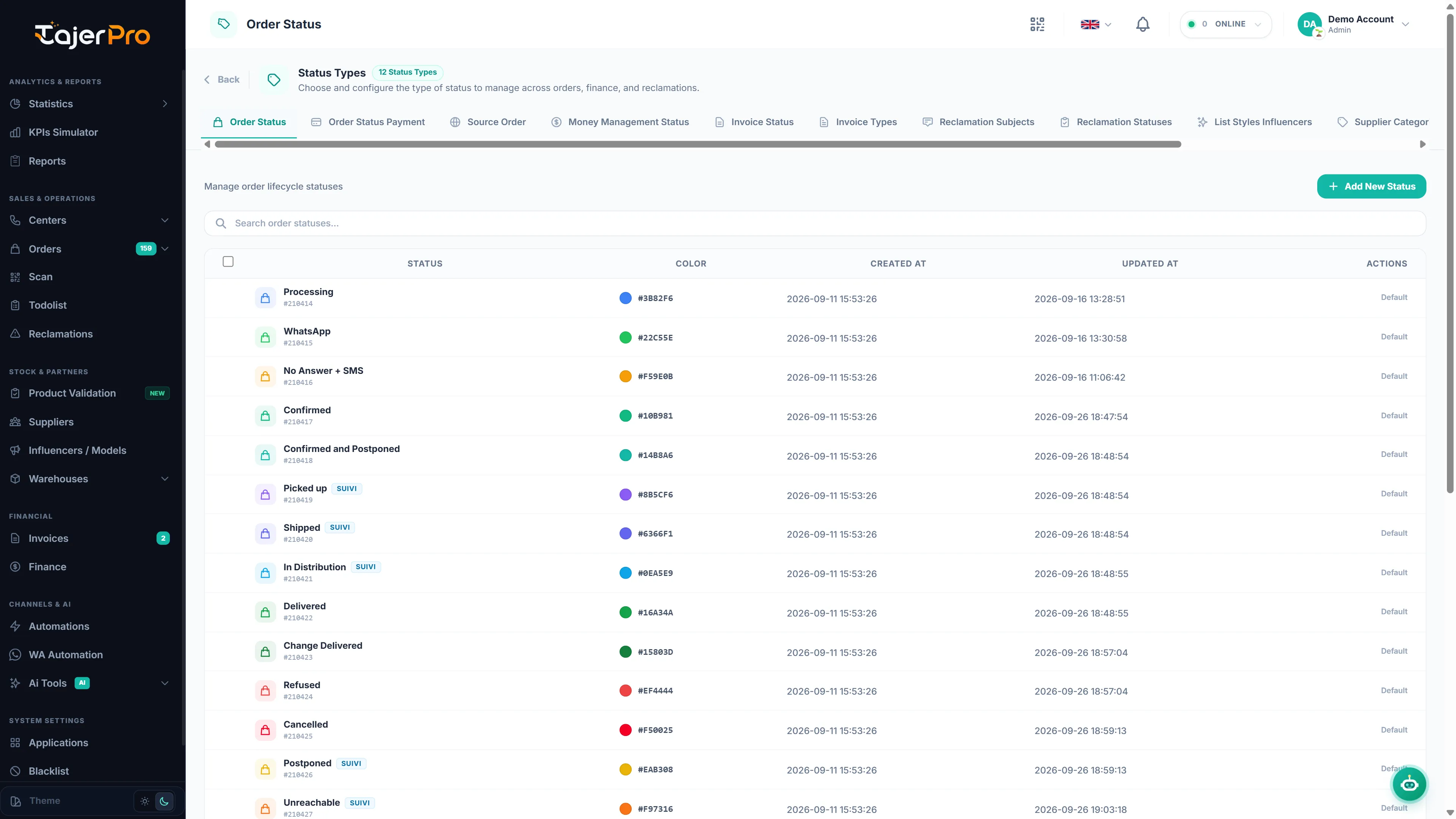
Default entries and your own entries
Section titled “Default entries and your own entries”Each list starts with a set of default entries — for example the order statuses Confirmed, Shipped, Delivered, or the money categories Facebook Ads, Salary Payment, Bank Fees. They are marked Default: you can use them everywhere, but not rename or delete them.
Add your own entries next to them. Yours can be edited, recolored and deleted (tick several to delete them in one go).
Translations
Section titled “Translations”Every entry has a name in English, French and Arabic. TajerPro shows the name in the language each user has chosen — in order lists, filters, the Call Center and Suivi buttons, reports, invoices, PDFs and exports. When you add an entry, fill Translations (optional) — Arabic, French, English. Leave a field empty to show the main name in that language.
Order statuses
Section titled “Order statuses”TajerPro’s own order statuses are marked System: you can use them everywhere, but not edit or delete them. You can add up to 20 statuses of your own (the counter shows N / 20).
The type of a status
Section titled “The type of a status”When you add an order status, choose its Type. The type tells TajerPro what the status means, so your own statuses count correctly everywhere — statistics, reports, Finance, invoices, the order lists and automations:
| Type | Meaning | Example |
|---|---|---|
| Processing | Not confirmed yet (calls, follow-up…) | Rappel demain |
| Confirmed | Confirmed, waiting to ship | Confirmé – emballage |
| In delivery | With the carrier, not delivered yet | Chez le livreur |
| Delivered | Delivered and paid by the customer | Livré client |
| Returned / Refused | Refused or coming back | Refus client |
| Cancelled | Cancelled before shipping | Annulé – stock |
For example, a status Livré client with the type Delivered counts in the delivery rate, in the amount the carrier owes you and in your invoices, and sets the order to Payé — exactly like Livré. A Processing status appears in the Processing orders list.
Every status shows its type in the Type column. You can change the type of your own statuses at any time.
Other settings
Section titled “Other settings”- Each order status has a colour.
- Turn on Suivi / Tracking for the statuses that mean « still on its way »: orders with these statuses appear in the Suivi Center and count as pending in Reports.
- Delivery companies report their own statuses, which you link to yours in Status mapping.