

Navigation & Sidebar
The sidebar is your main map of TajerPro. Items are grouped by area, and some groups expand to reveal sub-pages.
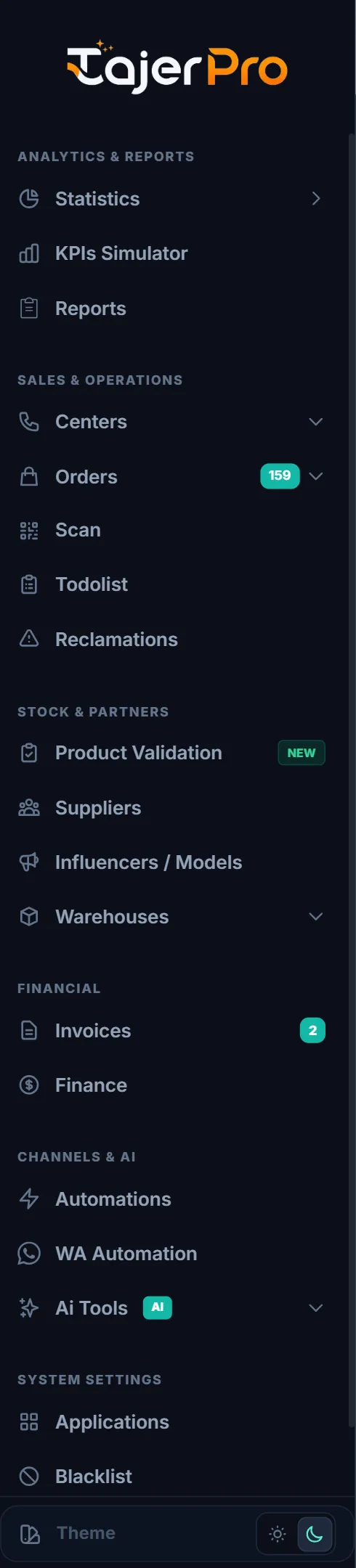
Sidebar groups
Section titled “Sidebar groups”- Analytics & Reports — Statistics, KPIs Simulator, Reports.
- Sales & Operations — Centers (Call Center + Suivi Center), Orders (All / Processing / Confirmed / Suivi / Duplicate / Annulé-Confirmed), Scan, Todolist, Reclamations.
- Stock & Partners — Suppliers, Influencers / Models, Warehouses.
- Financial — Invoices, Finance.
- Channels & AI — WA Automation, AI Tools.
- System Settings — Applications, Blacklist, Settings.
What you see depends on your access
Section titled “What you see depends on your access”The sidebar only shows pages your role is allowed to open, and features your plan includes. Two team members can therefore see different sidebars. To change who sees what, the owner edits roles under Settings — see Roles & Permissions.
Language
Section titled “Language”TajerPro is available in English, French and Arabic (right-to-left). Switch languages from the flag menu in the top bar; your choice is remembered on your device.