

Recurring entries & budgets
The Recurring & Budgets tab of Finance handles the money that comes back regularly and the limits you do not want to go over.
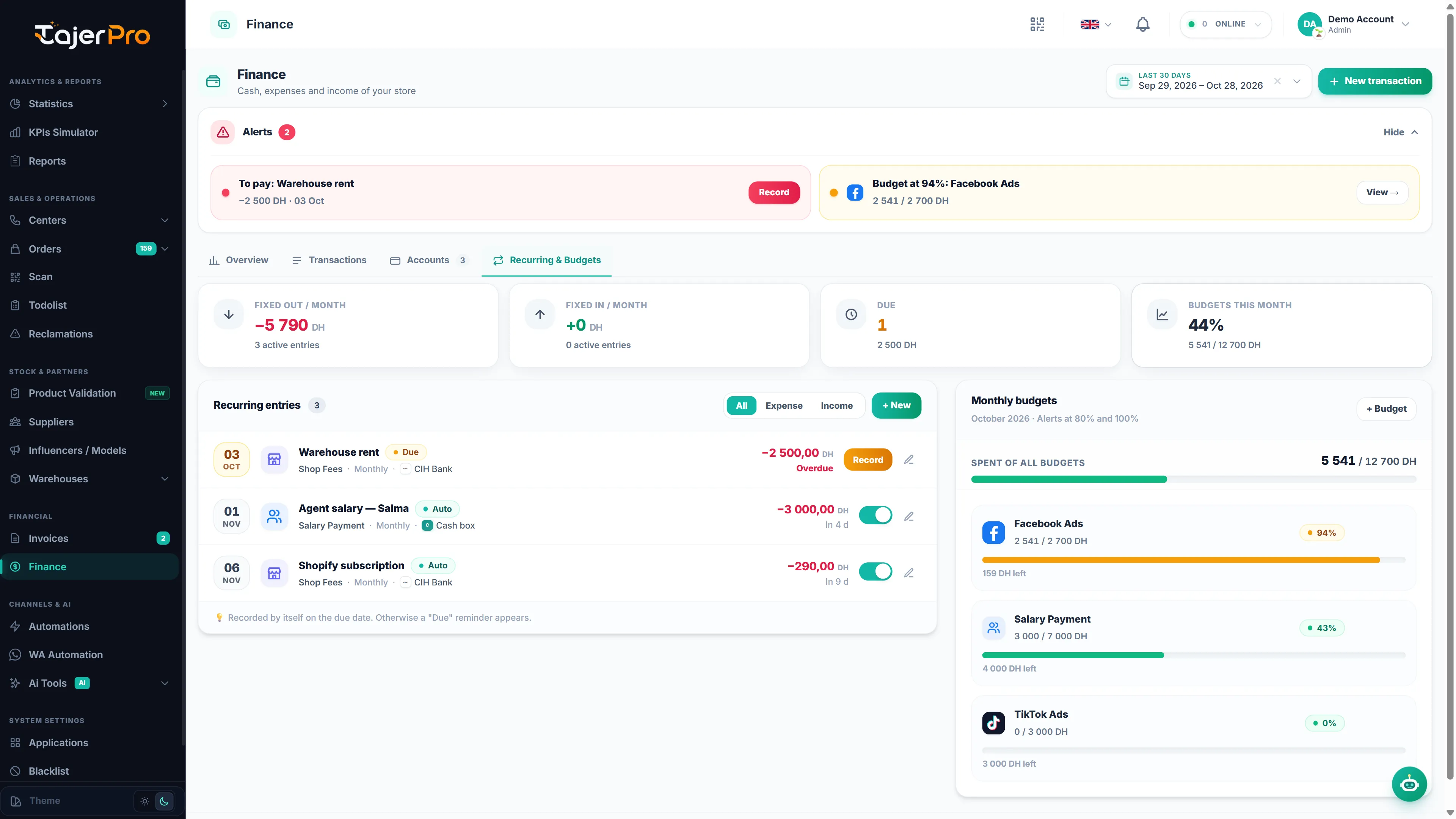
The top of the tab sums it up:
| Card | Meaning |
|---|---|
| Fixed out / month | What your active recurring expenses cost per month (weekly, quarterly and yearly entries converted to a monthly amount). |
| Fixed in / month | The same for recurring income. |
| Due | How many entries have reached their date and are waiting to be recorded, and their total. |
| Budgets this month | The share of all your budgets already spent this month. |
Recurring entries
Section titled “Recurring entries”A recurring entry is an expense or income that repeats: a salary, the warehouse rent, a Shopify subscription, a phone plan…
Create one
Section titled “Create one”- Click New (or turn on Make it recurring while adding a transaction).
- Choose Expense or Income, give it a Name (e.g. Salary — Yassine), a Category and an Amount.
- Pick the Account, the Payment method and the Payee / payer.
- Set the Frequency (Weekly, Monthly, Quarterly or Yearly), the Next date and, optionally, an End date.
- Choose how it is recorded:
- Auto-record on: the transaction is added by itself on the due date.
- Auto-record off: on the due date a Due reminder appears, and you record it yourself.
- Save.
The list
Section titled “The list”Each line shows the next date with a countdown (Today, In N d, Overdue), the category, frequency and account, the amount, and a badge: Auto, Reminder, Due or Paused.
- Click Record on a due reminder to save the transaction in one click.
- Use the switch to turn Auto-record on or off.
- Filter with All, Expense or Income.
- Open an entry to edit it, pause it (uncheck Active) or delete it. Transactions already recorded stay in the journal.
Monthly budgets
Section titled “Monthly budgets”A budget is a monthly limit for an expense category — for example 6 000 DH of Facebook Ads.
- Click Budget, pick the category and type the Monthly limit (DH).
- Choose Every month or Only the current month. A budget for one month overrides the « every month » amount for that month.
- Save.
The panel shows the total spent against all budgets, and for each category the amount spent, a progress bar, and N DH left or Over by N DH.
Alerts and notifications
Section titled “Alerts and notifications”- At 80 % of a budget the category turns orange, and at 100 % red.
- Recurring entries due within 3 days, and reminders that have reached their date, are listed in the Alerts block of Money Management.
- You also get a bell notification for each budget threshold reached, each « due soon » and « to pay » reminder, and each entry recorded automatically. See Notifications.
Automatic entries are recorded on their due date, even if nobody opens the app that day.