

Product Validation
The Product Validation pipeline (/dashboard/product-validation) is a structured e-commerce product research and qualification dashboard built directly into TajerPro.
Instead of launching ad campaigns or purchasing inventory blindly, media buyers and e-commerce operators evaluate prospective product URLs against 9 battle-tested Winning Product Criteria. Each criterion awards 1 point, and a customizable Passing Score Threshold (recommended 6 / 9) determines whether the candidate product qualifies for store listing and paid ad testing.
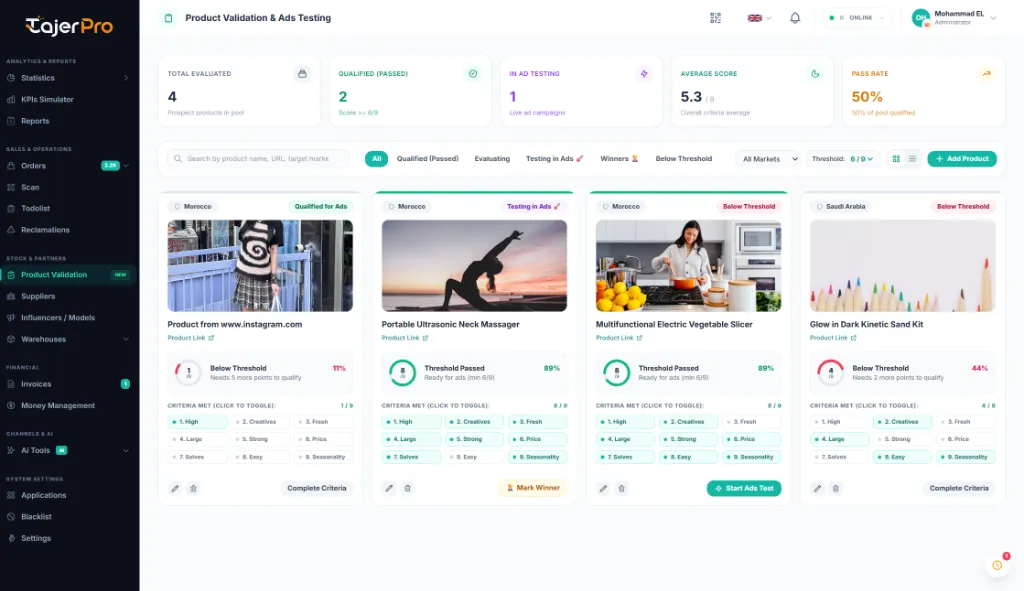
The 9 Winning Criteria Framework
Section titled “The 9 Winning Criteria Framework”Each criterion evaluates a critical pillar of winning e-commerce products in competitive direct-to-consumer and cash-on-delivery (COD) markets:
| # | Criterion | Key | Strategic Focus | What to Look For |
|---|---|---|---|---|
| 1 | High Comments & Engagement | crit_comments |
Social Proof & Viral Engagement | Competitor posts and video ads display high comment volume, frequent shares, and active customer purchase inquiries. |
| 2 | Creatives Ready & Available | crit_creatives |
Media Assets & UGC Availability | High-quality user-generated content (UGC), video hooks, and demonstration clips are readily available to edit and launch tests rapidly. |
| 3 | Fresh Market / Not Saturated | crit_market_fresh |
Market Unsaturation & Novelty | The product offer has not been heavily burned or over-saturated by local competitors in your target geographic market. |
| 4 | Large Audience Size | crit_audience_size |
Broad Mass-Market Demographic | Broad mass-market demographic appeal across ages and lifestyles rather than an overly narrow micro-niche. |
| 5 | Strong Marketing Angles | crit_marketing_angles |
Multi-Angle Positioning | The product can be pitched through multiple distinct emotional angles (problem solving, time saving, safety, confidence, gifting). |
| 6 | Price With High Value | crit_price_value |
High Perceived Value & Margin | Strong perceived value that commands customer willingness to pay, protecting healthy 3x–4x profit margins to absorb advertising costs. |
| 7 | Solves Real Problem / Pain Point | crit_problem_solver |
Urgent Pain Point Resolution | Solves an urgent, relatable, or frustrating daily issue that triggers spontaneous impulse purchasing without prolonged hesitation. |
| 8 | Easy Local Production / Sourcing | crit_easy_production |
Supply Chain & Restock Speed | Readily accessible from local wholesale suppliers or easy to manufacture locally with quick restocking turnaround times. |
| 9 | Seasonality & Perfect Timing | crit_seasonality |
Evergreen Appeal & Peak Timing | Evergreen demand all year round, or timed perfectly ahead of an upcoming seasonal peak, holiday, or weather transition. |
Scoring & Passing Score Threshold
Section titled “Scoring & Passing Score Threshold”- Every criterion is a binary toggle giving +1 point (0 or 1).
- Total score ranges from 0 to 9.
- The Passing Score Threshold can be calibrated globally or customized per candidate product:
5 / 9— Relaxed threshold for testing experimental niches or low ad-cost test campaigns.6 / 9 (Recommended)— Balanced threshold required for strong winning potential and consistent margin protection.7 / 9or8 / 9— High-conviction threshold required for large upfront inventory purchases or high-budget ad scale.
When a product reaches or exceeds the threshold (Score >= Passing Score), the system automatically flags it as Qualified for Ads with a vibrant emerald badge and unlocks immediate promotional next steps.
Pipeline Workflow Stages
Section titled “Pipeline Workflow Stages”Products progress smoothly through structured pipeline stages from initial discovery to scaled winner:
[ Under Evaluation ] ──(Score >= 6/9)──> [ Qualified for Ads ] │ ▼[ Below Threshold ] [ Added to Store ](Archived / Discarded) │ ▼ [ Testing in Ads 🚀 ] │ ▼ [ Winner 🏆 ]- Under Evaluation (
evaluating): The product URL is saved and currently undergoing research and creative analysis. - Qualified for Ads (
passed): The score met or exceeded the threshold. Ready to build the store product page and finalize ad creatives. - In Store (
in_store): Published to your online storefront catalog. - Testing in Ads (
testing_ads): Active paid campaigns are running across marketing channels (Meta, TikTok, Snapchat, Google). - Winner (
winner): The product achieved profitable ROAS and high delivery fulfillment rates; approved for bulk scaling. - Below Threshold (
rejected): The product scored below the required criteria threshold. Archived or put on hold.
Evaluation Modal
Section titled “Evaluation Modal”The dedicated evaluation popup provides a streamlined, distraction-free environment to audit products against the 9 criteria:
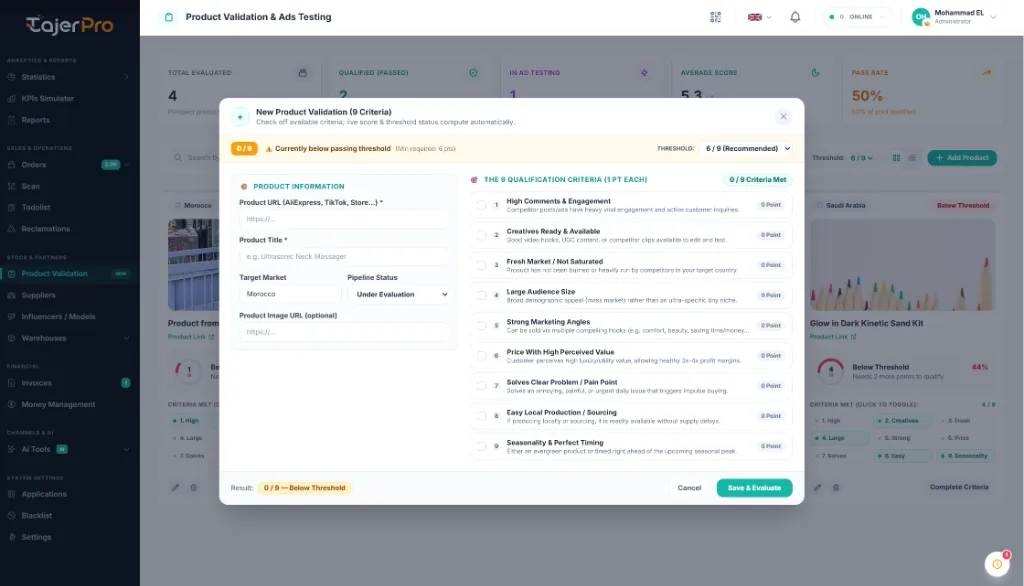
- Left Column: Product metadata inputs including the source URL, title, target country/market, current pipeline status, and image preview link.
- Right Column: Interactive checklist of the 9 winning criteria with a live score progress banner and threshold alert.
- Sticky Controls: Fixed header and footer ensure that saving and status updates are accessible instantly without excessive scrolling.
Dashboard Features & Capabilities
Section titled “Dashboard Features & Capabilities”1. Real-Time Performance KPIs
Section titled “1. Real-Time Performance KPIs”The top KPI banner tracks the overall health of your product research pipeline:
- Total Evaluated: Total candidate products logged into the research pipeline.
- Qualified (Passed): Count of products meeting or exceeding the passing threshold (
>= 6/9). - In Ad Testing: Number of candidate products currently undergoing active paid ad testing.
- Average Score: Overall criteria score average across all evaluated candidates.
- Pass Rate %: Percentage of researched products that successfully qualified for store testing.
2. Modern 4 Cards Per Row Grid View
Section titled “2. Modern 4 Cards Per Row Grid View”- Displays products in an optimized, clean 4 cards per line layout on standard desktop viewports.
- High-resolution product preview image banner with automatic fallback handling.
- Product Title and clickable external source/supplier links clearly positioned directly below the image.
- Circular SVG visual gauge displaying
Score / 9with color-coded status rings. - Interactive Micro-Chips: Toggle any of the 9 criteria points directly from the card without having to reopen the modal.
- Quick action buttons to advance products into testing (
🚀 Start Ads Test), mark as a winner (🏆 Mark Winner), or edit criteria.
3. High-Density Table View
Section titled “3. High-Density Table View”Toggle from Grid to Table view for dense catalog reviews, column sorting, search filtering, and batch scanning across target markets.
4. Internationalization & Localization
Section titled “4. Internationalization & Localization”Full support for English, French, and Arabic (RTL) with instant directional layout updates across all metric cards, badges, modal forms, and notification alerts.
How to Add & Evaluate a Product (Step-by-Step)
Section titled “How to Add & Evaluate a Product (Step-by-Step)”- Open Stock & Partners → Product Validation from the sidebar.
- Click the + Add Product button in the top toolbar.
- Paste the Product URL (e.g., from AliExpress, TikTok Shop, Facebook Ad Library, or competitor store).
- Enter the Product Title and select your Target Market (e.g., Morocco, Saudi Arabia, UAE).
- Review each of the 9 criteria in the right panel and check off every condition met.
- Observe the live score indicator:
- If
Score >= 6, the banner displays🔥 Qualified for Store & Ads Testing!. - If below threshold, the banner indicates
⚠️ Currently below passing threshold.
- If
- Click Save & Evaluate.
- Once ad assets and landing pages are prepared, click 🚀 Start Ads Test on the card to advance the status into active testing.