

Finance overview
Finance (formerly Money Management) is where you follow the cash of your store: what came in, what went out, where your money sits (cash box, bank, couriers, ads accounts) and what is about to be paid.
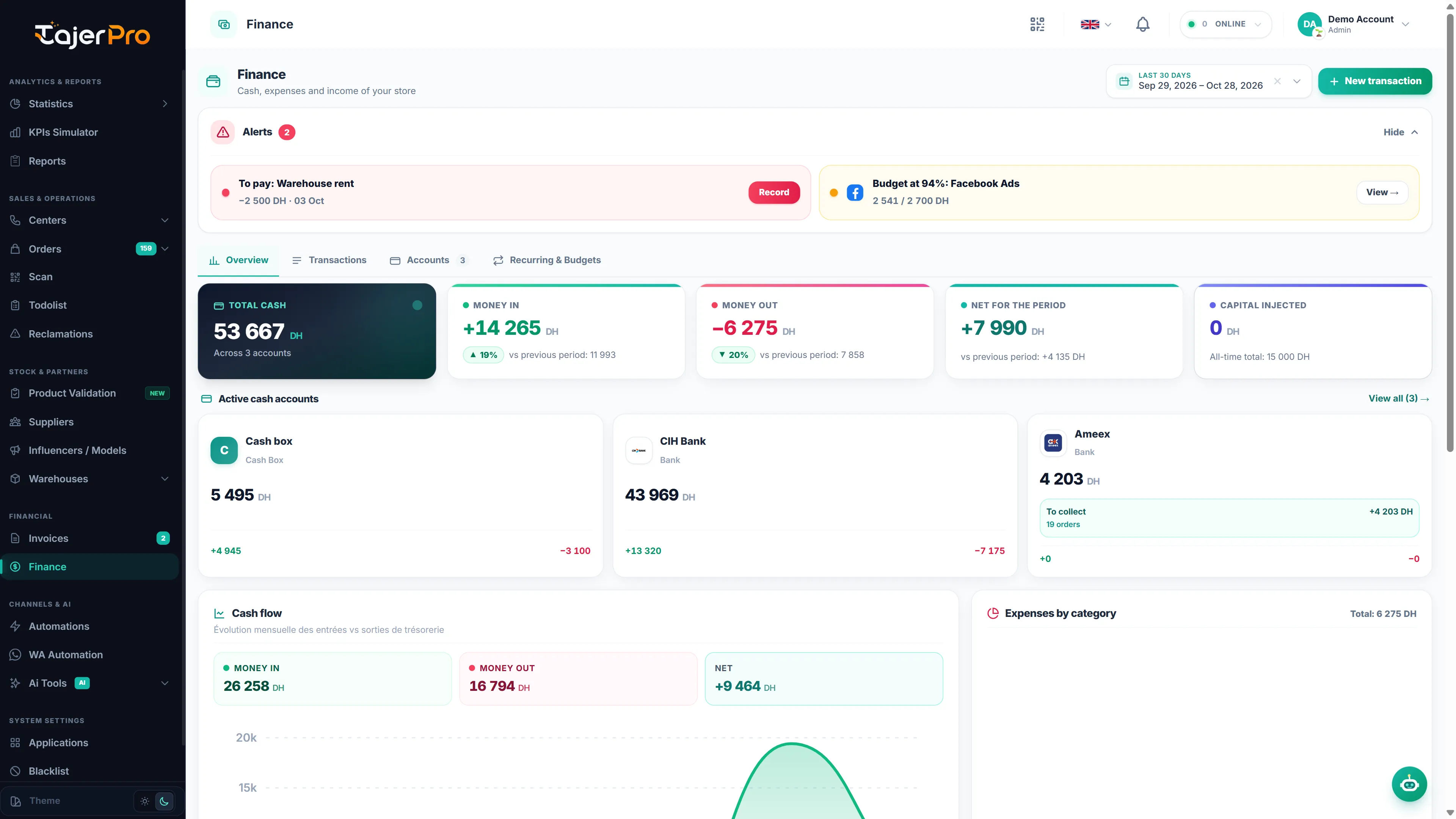
The page has four tabs:
| Tab | What you do there |
|---|---|
| Overview | Read the dashboard described on this page. |
| Transactions | The journal of every movement: search, filter, edit, export. See Transactions. |
| Accounts | Your cash box, banks, couriers and ads accounts, with their balances and transfers. See Accounts & transfers. |
| Recurring & Budgets | Salaries, rent and subscriptions that come back every month, and monthly limits per category. See Recurring & budgets. |
At the top right you choose the period (this month, last month, last 3 months, this year, all time, or any custom range) and add an entry with New transaction.
Alerts
Section titled “Alerts”When something needs your attention, an Alerts block appears above the tabs. You can hide it with Hide and bring it back with Show. It lists:
- Budget exceeded (red) or Budget at 80 % or more (orange) for a category — click View to open its transactions.
- To pay — a recurring entry set as a reminder has reached its date. Click Record to save the transaction in one click.
- In N days — a recurring entry is due within the next 3 days.
- Negative balance — an account is below zero. Click View to see its transactions.
The same events also reach your notification bell — see Notifications.
The KPI cards
Section titled “The KPI cards”| Card | What it shows |
|---|---|
| Total cash | The balance of all your accounts together (opening balances + every movement). Courier accounts that follow a delivery company also include the money still to collect from that company. |
| Money in | Income recorded in the selected period, compared with the previous period of the same length. |
| Money out | Expenses recorded in the selected period, compared with the previous period. |
| Net for the period | Money in − money out. Capital you inject and transfers between your accounts are left out, so it reflects the real result of the store. |
| Capital injected | Money you put into the business yourself (category New Investment) during the period, with the all-time total below. It is shown apart and never counted as income. |
Accounts strip
Section titled “Accounts strip”Under the cards, each account shows its balance and what came in and went out during the period. A courier account that follows a carrier also shows To collect and the number of orders behind it. Click an account to open its transactions.
Charts
Section titled “Charts”- Cash flow — money in and money out month by month, with the totals and the net of the period. Hover (or tap) a month to read its figures.
- Expenses by category — where the money went, with each category’s share. Click a category to open its transactions.
Budgets, upcoming payments and top payees
Section titled “Budgets, upcoming payments and top payees”- Budgets this month — how much of each monthly budget is already spent. Click Manage to edit them.
- Upcoming payments — the next recurring entries, marked Auto (recorded by itself), Reminder or Due.
- Top payees — the people and companies you paid the most in the period.
Where the numbers come from
Section titled “Where the numbers come from”Most entries are added by your team, but some are created for you:
- When you mark a carrier invoice as Paid, the payout is recorded as income automatically, and removed again if you set the invoice back to unpaid. See Invoices.
- Payments to suppliers are recorded as expenses. See Suppliers.
- Recurring entries set to auto-record are added on their due date.
These entries carry an Auto badge in the journal.
TajerPro comes with default transaction categories in English, French and Arabic, and you can add your own in Settings → Status types → Money management status. See Status types.